








OPTIMUMWRAP / COLOR EXPLORER
Car Wrap Color Visualizer for Vinyl & Color PPF
Explore Color PPF and Vinyl Wrap through vehicle photo references. Choose a color, review its appearance and find the matching product.
Choose a film type → Pick a color → Confirm with a physical sample
Appearance reference only. Preview colors and finishes are approximate; confirm your selection with a physical sample.
Choose your film and preview its appearance
Tiffany Blue
CSP-A003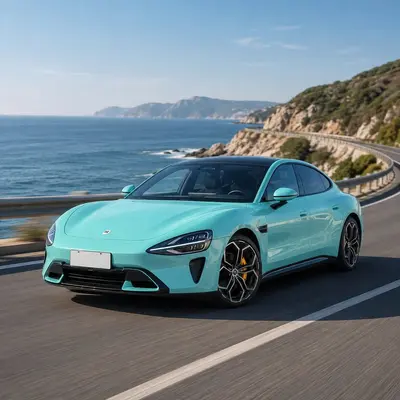
Porsche 911 Carrera 4S
Tiffany Blue · CSP-A003Loading 3D vehicle…
Product photo reference
Screen colors and finishes are indicative. Color shifts, textures and transparent films are approximations. Confirm with a physical swatch.
3D model credits
Porsche 911 Carrera 4S — Karol Miklas · CC BY-SA 4.0
BMW M4 Competition — SRT Performance · CC BY 4.0
Ferrari 458 Italia — vicent091036 · CC BY 4.0
BUILD YOUR SAMPLE SET
PPF & Vinyl Wrap Sample Selector
Pick a film type, find a color and add it to your shortlist. Compare the selected versions before requesting physical samples.
How to use the sample selector
- Choose Clear PPF, Color PPF or Vinyl Wrap, then search a color or product reference.
- Add the versions you want to compare. The same color in two film types counts as two separate samples.
- Review the list and open the sample form. Add your delivery country and say whether you need color swatches or installation trial material.
The Visualizer Helps You Narrow Choices
Use it to shortlist colors and finishes for your project, then request samples of the films you are most interested in.
Each color has its own vehicle photo references; the model, angle and lighting may differ between products. Compare the overall appearance, then use physical samples for a like-for-like comparison. The tool works for both Color PPF and Vinyl Wrap collections.
Screen colors are never exact. Always order swatches and check them under daylight before you commit to a full roll.
Common Questions
Is the visualizer an exact color match?
No. Screen color depends on display, lighting and the vehicle reference photo. Use the visualizer to narrow choices, then confirm the actual color with a physical sample.
Can I buy a color just from the preview?
You can select a color and send an inquiry, but we recommend requesting a sample first to confirm the look and feel before ordering a full roll.
What's the difference between the photo visualizer and the 3D simulator?
This page shows vehicle photo references. Open the 3D simulator to explore an interactive model. Your selected color and film type travel with you.